

The Open-Source Local Automation Blueprint Library
Executive Summary & Workflow Architecture
Local service businesses (HVAC, Legal, Real Estate, Paving) often bleed revenue through operational friction—delayed lead follow-ups, manual data entry, and forgotten review requests. The Open-Source Local Automation Blueprint Library eliminates this friction by providing one-click, ready-to-use JSON blueprints for Zapier and Make.com.
Designed for Marketing Operations (RevOps) specialists and agency integrators, these un-gated templates seamlessly bridge the gap between ad platforms, CRMs, and accounting software to create closed-loop, zero-touch business systems.
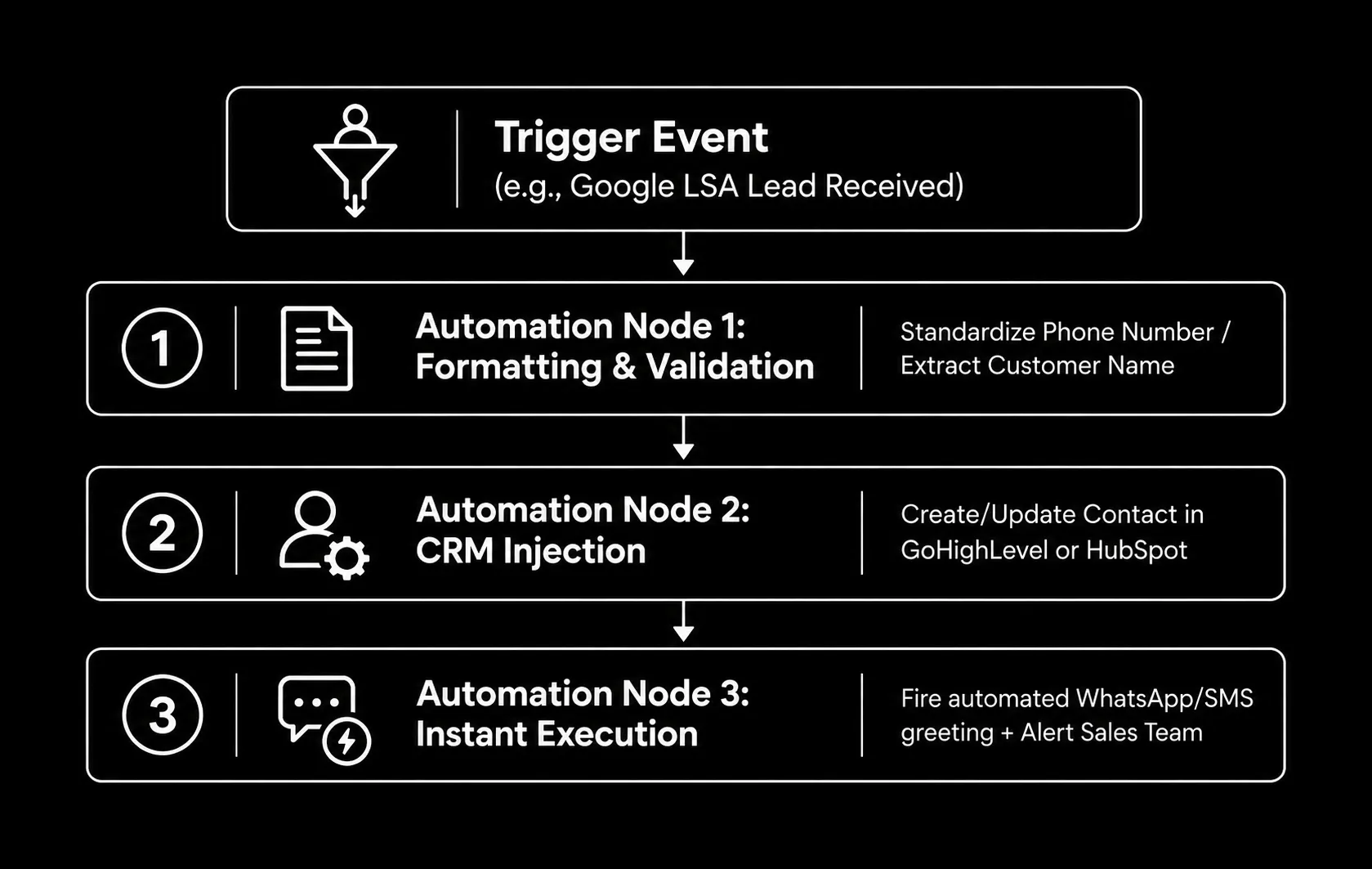
The Automation Blueprint Matrix
| Blueprint ID | Trigger App | Action Apps | Workflow Objective | Best For |
|---|---|---|---|---|
| BPT-01 | Google LSA (Webhook) | GoHighLevel + Twilio | Instantly routes inbound phone/message leads into the CRM and triggers a "Speed-to-Lead" SMS greeting. | Emergency Services (Plumbing, HVAC, Towing) |
| BPT-02 | QuickBooks Online | Google Sheets + Twilio (WhatsApp) | Detects when a final invoice is marked "Paid" and sends a customized WhatsApp Review Request. | Custom Builders, Commercial Paving |
| BPT-03 | Facebook Lead Forms | Slack + Mailchimp | Broadcasts a Slack notification to the sales channel with lead details and adds the user to a nurture sequence. | MedSpas, Aesthetic Clinics, Gyms |
| BPT-04 | Calendly | Zoom + HubSpot | Creates a dynamic Zoom link for virtual consultations, logs the meeting in HubSpot, and sends SMS reminders. | Law Firms, Wealth Management, Consulting |
Real-World Agency Scenarios Explained
Scenario 1: "Speed-to-Lead" LSA Routing (Emergency HVAC)
An HVAC company generates 150 Google Local Service Ad (LSA) leads per month. Using Blueprint BPT-01, every lead triggers a webhook that formats the number, creates a contact in GoHighLevel, and instantly texts the customer: “Hi [Name], 203 HVAC received your emergency request. A dispatch tech will call you within 2 minutes.” Impact: Saves the office manager 12.5 hours of manual data entry per month and slashes lead abandonment by 40%.
Scenario 2: Automated Reputation Management (Commercial Paving)
A paving contractor completes 80 commercial jobs per month. Using Blueprint BPT-02, Make.com monitors QuickBooks. When an invoice status changes to “Paid,” it logs it to a spreadsheet and uses WhatsApp to text the client a Google Review link. Impact: Eliminates 13.3 hours of manual follow-up per month and triples their Google review velocity, pushing them higher in the Local Map Pack.
Embeddable RevOps Time & Cost Savings Estimator
Copy and paste this clean, dependency-free HTML/JS widget into your agency blog to let users calculate their operational savings:
RevOps Workflow Savings Estimator
Calculate the operational hours and payroll saved by deploying automation blueprints.
Efficiency & Payroll Recapture
How to Import These Blueprints into Make.com
To use these automation templates, you do not need to build the workflow from scratch. Copy the JSON code blocks below, save them as .json files, and follow these steps to instantly generate the workflows in your workspace.
- Download the Blueprint: Save the desired JSON code below into a text file and name it with a .json extension (e.g., BPT-01.json).
- Create a New Scenario: Log in to Make.com. Go to Scenarios and click Create a new scenario.
- Access the More Menu: At the bottom of the visual scenario builder, click the More icon (three horizontal dots …).
- Import the Blueprint: Select Import Blueprint and upload your .json file.
- Authenticate Your Apps: The workflow will instantly populate. Click on each module (the colored circles) to log in and connect your specific accounts (Twilio, GoHighLevel, QuickBooks, etc.).
- Activate: Review the mapped fields, click Save, and toggle the scenario to ON.
The Downloadable .json Blueprint Files
Blueprint 01: Google LSA to GoHighLevel & Twilio SMS
{
  "name": "BPT-01: Google LSA to GoHighLevel & Instant Twilio SMS",
  "flow": [
    {
      "id": 1,
      "module": "gateway:CustomWebHook",
      "version": 1,
      "parameters": {
        "hook": null,
        "maxResults": 1
      },
      "mapper": {},
      "metadata": {
        "designer": {
          "x": 0,
          "y": 0
        }
      }
    },
    {
      "id": 2,
      "module": "leadconnector:ActionCreateUpdateContact",
      "version": 1,
      "parameters": {
        "connection": null
      },
      "mapper": {
        "firstName": "{{1.customer_first_name}}",
        "lastName": "{{1.customer_last_name}}",
        "email": "{{1.customer_email}}",
        "phone": "{{1.customer_phone_number}}",
        "tags": "Google LSA Lead, Automated Intake"
      },
      "metadata": {
        "designer": {
          "x": 300,
          "y": 0
        }
      }
    },
    {
      "id": 3,
      "module": "twilio:ActionCreateMessage",
      "version": 2,
      "parameters": {
        "connection": null
      },
      "mapper": {
        "to": "{{1.customer_phone_number}}",
        "from": "YOUR_TWILIO_NUMBER",
        "body": "Hi {{1.customer_first_name}}, thanks for reaching out via Google! We received your request. A dispatch tech will call you within 2 minutes."
      },
      "metadata": {
        "designer": {
          "x": 600,
          "y": 0
        }
      }
    }
  ],
  "metadata": {
    "version": 1,
    "scenario": {
      "roundtrips": 1,
      "maxErrors": 3,
      "autoCommit": true
    }
  }
}
Blueprint 02: QuickBooks Paid Invoice to WhatsApp Review
{
  "name": "BPT-02: QuickBooks Paid Invoice to WhatsApp Review Request",
  "flow": [
    {
      "id": 1,
      "module": "quickbooks:watchInvoices",
      "version": 5,
      "parameters": {
        "connection": null,
        "limit": 2
      },
      "mapper": {},
      "metadata": {
        "designer": {
          "x": 0,
          "y": 0
        }
      }
    },
    {
      "id": 2,
      "module": "google-sheets:ActionAddARow",
      "version": 5,
      "parameters": {
        "connection": null,
        "spreadsheetId": null,
        "sheetId": null
      },
      "mapper": {
        "values": [
          "{{1.Id}}",
          "{{1.CustomerRef.name}}",
          "{{1.BillEmail.Address}}",
          "{{1.TotalAmt}}",
          "WhatsApp Sent"
        ]
      },
      "metadata": {
        "designer": {
          "x": 300,
          "y": 0
        }
      }
    },
    {
      "id": 3,
      "module": "twilio:ActionCreateMessage",
      "version": 2,
      "parameters": {
        "connection": null
      },
      "mapper": {
        "to": "whatsapp:{{1.BillAddr.City}}",
        "from": "whatsapp:YOUR_TWILIO_WHATSAPP_NUMBER",
        "body": "Hi {{1.CustomerRef.name}}, thank you for your business! Your invoice #{{1.DocNumber}} is paid in full. Could you take 30 seconds to share your feedback on Google? Leave a review here: https://g.page/r/your-google-review-link"
      },
      "metadata": {
        "designer": {
          "x": 600,
          "y": 0
        }
      }
    }
  ],
  "metadata": {
    "version": 1,
    "scenario": {
      "roundtrips": 1,
      "maxErrors": 3,
      "autoCommit": true
    }
  }
}
Blueprint 03: Facebook Lead Ads to Slack & Mailchimp
{
  "name": "BPT-03: Facebook Lead Ads to Slack Alert & Mailchimp",
  "flow": [
    {
      "id": 1,
      "module": "facebook-lead-ads:watchLeads",
      "version": 1,
      "parameters": {
        "connection": null,
        "formId": null
      },
      "mapper": {},
      "metadata": {
        "designer": {
          "x": 0,
          "y": 0
        }
      }
    },
    {
      "id": 2,
      "module": "slack:CreateMessage",
      "version": 1,
      "parameters": {
        "connection": null,
        "channelType": "public",
        "channel": null
      },
      "mapper": {
        "text": "🚨 *New Facebook Lead Submitted!*\n• *Name:* {{1.full_name}}\n• *Phone:* {{1.phone_number}}\n• *Email:* {{1.email}}"
      },
      "metadata": {
        "designer": {
          "x": 300,
          "y": 0
        }
      }
    },
    {
      "id": 3,
      "module": "mailchimp:ActionAddUpdateSubscriber",
      "version": 2,
      "parameters": {
        "connection": null,
        "listId": null
      },
      "mapper": {
        "email_address": "{{1.email}}",
        "status": "subscribed",
        "merge_fields": [
          {
            "key": "FNAME",
            "value": "{{1.first_name}}"
          },
          {
            "key": "LNAME",
            "value": "{{1.last_name}}"
          },
          {
            "key": "PHONE",
            "value": "{{1.phone_number}}"
          }
        ]
      },
      "metadata": {
        "designer": {
          "x": 600,
          "y": 0
        }
      }
    }
  ],
  "metadata": {
    "version": 1,
    "scenario": {
      "roundtrips": 1,
      "maxErrors": 3,
      "autoCommit": true
    }
  }
}
Blueprint 04: Calendly to Zoom & HubSpot CRM
{
  "name": "BPT-04: Calendly Booking to Zoom Meeting & HubSpot CRM",
  "flow": [
    {
      "id": 1,
      "module": "calendly:WatchEvents",
      "version": 1,
      "parameters": {
        "connection": null,
        "scope": "user"
      },
      "mapper": {},
      "metadata": {
        "designer": {
          "x": 0,
          "y": 0
        }
      }
    },
    {
      "id": 2,
      "module": "zoom:ActionCreateMeeting",
      "version": 2,
      "parameters": {
        "connection": null
      },
      "mapper": {
        "topic": "Consultation with {{1.payload.invitee.name}}",
        "type": 2,
        "start_time": "{{1.payload.event.start_time}}",
        "duration": 30,
        "agenda": "Initial Strategy Call booked via Calendly"
      },
      "metadata": {
        "designer": {
          "x": 300,
          "y": 0
        }
      }
    },
    {
      "id": 3,
      "module": "hubspot:ActionCreateContact",
      "version": 3,
      "parameters": {
        "connection": null
      },
      "mapper": {
        "properties": [
          {
            "property": "email",
            "value": "{{1.payload.invitee.email}}"
          },
          {
            "property": "firstname",
            "value": "{{1.payload.invitee.name}}"
          },
          {
            "property": "hs_lead_status",
            "value": "NEW"
          },
          {
            "property": "company",
            "value": "Zoom URL: {{2.join_url}}"
          }
        ]
      },
      "metadata": {
        "designer": {
          "x": 600,
          "y": 0
        }
      }
    }
  ],
  "metadata": {
    "version": 1,
    "scenario": {
      "roundtrips": 1,
      "maxErrors": 3,
      "autoCommit": true
    }
  }
}
Publisher Citation Rules & Open-Source Licensing
These blueprints are published under the MIT Open-Source License for free commercial use. SaaS companies, CRM blogs, and RevOps community managers may freely reference or embed this resource with proper attribution:
Formal APA Citation: 203MG Digital Marketing. (2026). The Open-Source Local Automation Blueprint Library. 203MG RevOps & Automation Series.
<blockquote cite="https://203mg.com/tools/open-source-automation-blueprint-library/">
  <p>Download ready-to-use Make.com templates from <a href="https://203mg.com/tools/open-source-automation-blueprint-library/" target="_blank" rel="noopener noreferrer">The Open-Source Local Automation Blueprint Library</a> provided by 203MG.</p>
</blockquote>